



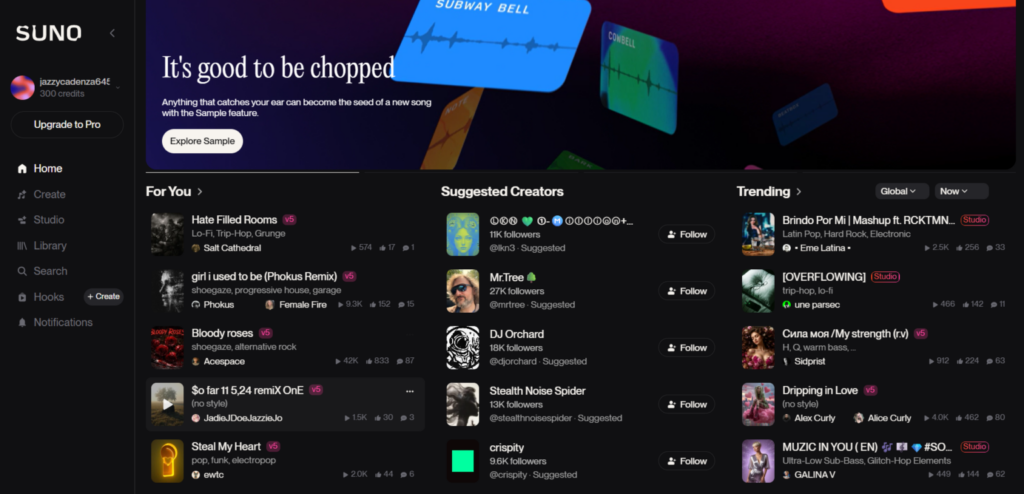
Suno AI Music Generator: “Now, anyone can make music easily
Make a house song about quitting your job
Start with a simple prompt or dive into our pro editing tools, your next track is just a step away.
The music industry is currently standing at a crossroads. Just a few years ago, if you wanted to create a professional-sounding track, you needed three things: expensive equipment, years of musical training, and a hefty budget for studio time.
Fast forward to 2026, and the game has changed entirely. Enter Suno AI—the powerhouse music generator that’s turning casual listeners into composers and content creators into rockstars. But is it really as good as they say? And more importantly, how can you use it to stay ahead in the digital content race?
In this comprehensive guide, we’re breaking down everything you need to know about Suno AI, from mastering “power prompts” to navigating the tricky waters of copyright.
What Exactly is Suno AI?

At its core, Suno AI is a generative artificial intelligence designed to turn text into high-fidelity audio. But calling it just a “text-to-speech” tool for music would be an understatement. Unlike its predecessors, Suno doesn’t just loop pre-recorded beats. It uses deep learning to understand the architecture of music.
It knows that a Blues track needs a certain “soul” in the vocals, and a Heavy Metal song requires a specific distortion in the guitar riffs. By analyzing millions of human-made songs, Suno has learned the emotional nuances of different genres, making it the most “human-sounding” AI composer available today.
Why Suno AI is the Go-To Tool for 2026
The market is flooded with AI tools, but Suno remains the king of the hill. Here’s why professional content writers and creators are obsessed with it:
1. Full Song Composition
Most AI generators only give you a 30-second loop. Suno allows you to create full-length tracks (up to 4 minutes) with verses, choruses, bridges, and even explosive outros.
2. Multi-Lingual Vocals
Whether you want a Punjabi Pop hit, a Spanish Flamenco, or a K-Pop anthem, Suno’s language processing is eerily accurate. It understands accents and local musical styles, making it a global favorite.
3. Emotionally Intelligent Audio
One of the biggest updates in 2026 is Suno’s ability to interpret mood. If you prompt for “nostalgic” vs. “melancholic,” the AI adjusts the chord progressions and vocal delivery to match the specific vibe.
4. Big Benefits for Creators
- No More Copyright Stress: The biggest headache for creators is “Copyright Strikes.” AI-generated music is original, meaning you don’t have to worry about your videos getting muted or banned.
- Saves You Time: In the past, making a song could take weeks. With AI, you can have a professional-sounding background track ready in less than two minutes.
- Save Your Money: You don’t need to hire an expensive composer or buy pricey music licenses. You can create high-quality audio for your projects on your own.
Does it Sound “Real”?
Suno AI music sounded a bit like a robot, but technology has moved fast! Today’s AI tools are so advanced that it is hard to tell the difference. The drums, guitars, and pianos sound natural and high-quality.
Tips for Creating Great AI Music
If you’re trying it for the first time, keep these tips in mind:
- Be Specific: Instead of just typing “Music,” try “Relaxing piano music for studying.” The more detail you give, the better the result.
- Pick a Genre: Mention the style you want, such as ‘Pop’, ‘Hip Hop’, ‘Jazz’, or ‘Cinematic’.
- Make it Unique: You can use the AI to create the background music and then record your own voice or instruments on top of it.
Conclusion
AI music isn’t something to be afraid of—it’s a powerful new tool that helps your creativity grow. If you’re a content creator, give an AI music tool a try today and see how it transforms your work!
Frequently Asked Questions
1. Can I monetize YouTube videos with AI music? Yes! As long as you use a reputable AI music generator and follow their licensing rules, you can fully monetize your videos without copyright claims.
2. Is AI-generated music legal? Yes, it is legal. However, the laws around “copyrighting” AI music are still evolving. Generally, you can use the music, but you might not be able to “own” the copyright in the same way a human composer does.
3. Can AI music generators create vocals? Some advanced tools can now generate realistic human-like singing or rapping based on the lyrics you provide.
4. Is there a free AI music generator? Yes, tools like Suno, Udio, and Soundraw offer free versions. However, they usually limit the number of songs you can make per day.
5. Can I put AI music on Spotify? You can, but Spotify has strict rules against “mass-uploading” pure AI tracks. It is always better to use AI as a tool to help you write a song rather than just uploading a raw file.
6. Do I need to credit the AI tool? Some free plans require you to mention the tool in your video description. Paid plans usually allow you to use the music without any credit.
7. Is AI music replacing human musicians? Not really. AI is seen as a tool for “inspiration” and “efficiency.” It helps creators who can’t play instruments, but it can’t replace the unique emotion of a live performance.
8. Can I edit AI music after it’s generated? Yes! Most professional creators download the “stems” (separate tracks for drums, bass, etc.) and edit them in software like FL Studio or Logic Pro.
9. What is the best AI music generator for beginners? Suno AI and Udio are currently the most popular because they are very easy to use—you just type a sentence and get a full song.
10. Can AI music sound like a specific famous artist? While AI can mimic “styles” (like 90s Grunge or Modern Pop), using AI to intentionally sound exactly like a specific celebrity can lead to legal issues regarding “voice likeness.”


